
Transferring Files with FTP

We recommend the freely available cross-platform Filezilla FTP client for handling large (>1G) file uploads. To connect to FolderGrid with FileZilla (or any compatible FTP client that supports FTPS) use the following settings:

Host: ftp.foldergrid.com
Port: 9021
Encryption: Require explicit FTP over TLS (also referred to as FTPS)
Logon Type: Normal
User:  {domain}:{username}
Password: {password}


Your FTP username is prefixed with your domain followed by a colon and then your actual FolderGrid username.
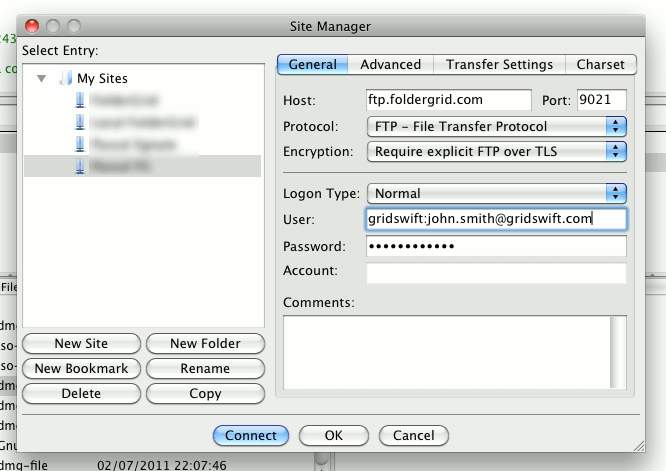
Filezilla Screenshot


Note: The nature of FTP dictates that using it will be slightly less efficient than uploading directly through our API or reference clients and we recommend using it only where necessary.

  • 1 Users Found This Useful
Was this answer helpful?

Related Articles

What is Compliant File Sharing?

Do you store and share sensitive files? In 2011, businesses unintentionally exposed over...

Robust File Storage Infrastructure

The Coburn Enterprises Compliant File Sharing solution is built on top of robust redundant...

Complete control over your files

Securing your data is about more than just using state-of-the-art encryption methods and...

Use Case: Compliant Enterprise File Secure Sync & Store

Collaborate with Common Files Project teams are able to create files, store them, enable...

Use Case: Simple & Secure Document Exchange

Simple Document Exchange Eliminate the overhead of account provisioning & management in...